
Beer Label Curling in Cold Storage: Diagnose the Mismatch
Table of Contents Beer Label Curling in Cold Storage: Diagnose the Mismatch Beer label curling in cold storage signals a facestock, adhesive, or application mismatch

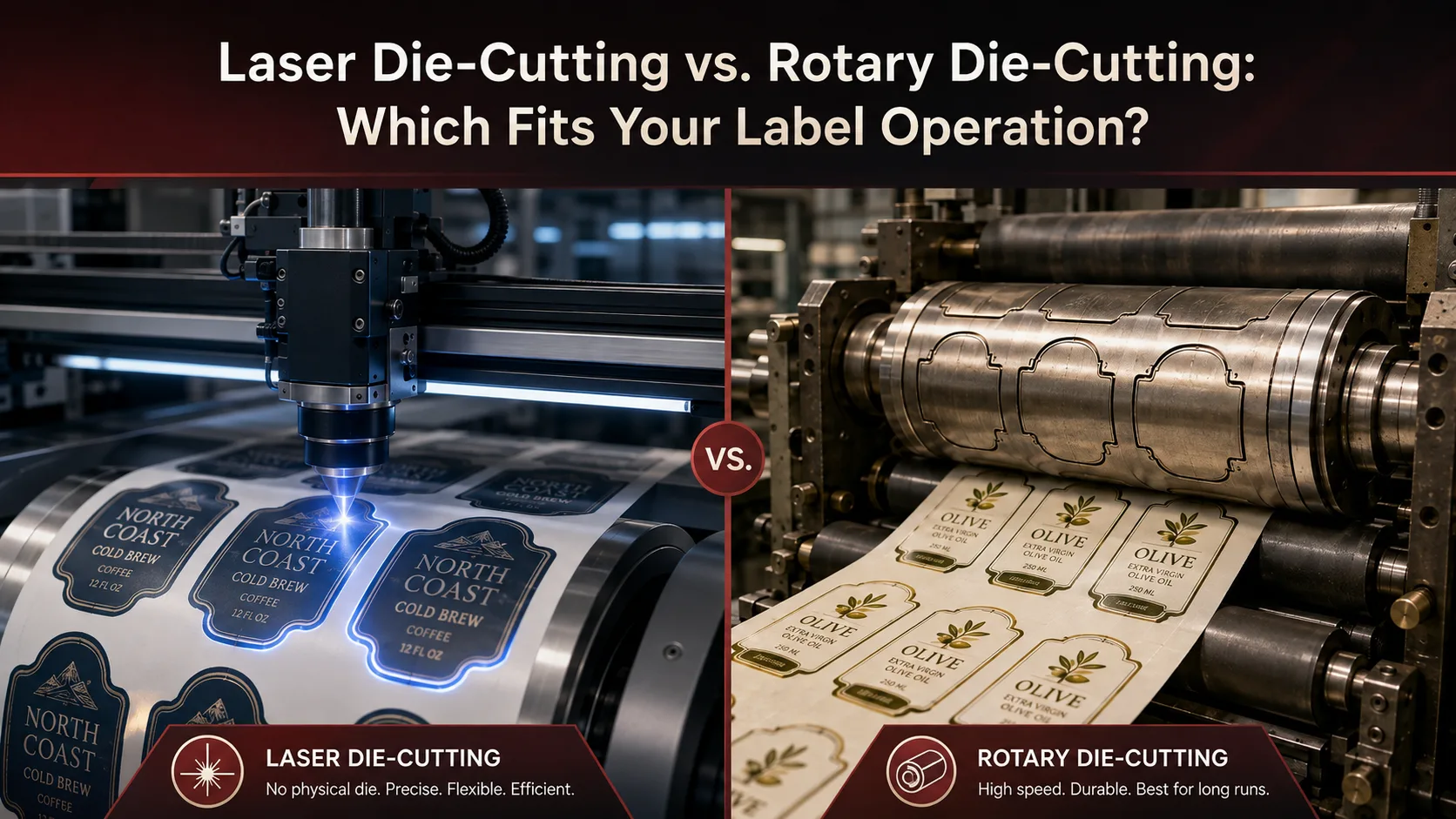
Laser die-cutting uses a CO₂ laser guided by a digital cut file to cut label shapes — with no physical dies to order, store, or swap between jobs.
Laser die-cutting replaces the physical cutting die with a digital cut file. A CO₂ laser head traces the shape across the label material — cutting through it entirely, kissing the liner, or performing a combination of cut types in the same pass. Because the cut path is defined in software, switching to a new shape is a matter of loading an updated file rather than sourcing and installing new tooling.
This makes laser finishing particularly well suited to operations that handle frequent design changes, custom label shapes, prototypes, or short-to-medium production runs. For brands and converters managing high SKU counts — where different label shapes may change seasonally or across product lines — laser finishing removes tooling procurement from the job setup workflow entirely.
Laser finishing systems are also typically multifunctional. Most combine lamination, laser die-cutting (full cut, kiss cut, perforation), matrix removal, slitting, and rewinding in a single inline pass — so the label exits the machine finished and ready for application without intermediate handling steps.
Rotary die-cutting uses a precision cylindrical die to cut label shapes as the web passes through — a proven method for high-volume, repeatable production of stable label shapes.
In a rotary die-cutting system, a cylindrical die engraved with the label shape rotates against the web as it moves through the machine, cutting the label contour in a continuous, repeatable motion. It is a mature technology well suited to production environments where the same shape runs at high volume over extended periods.
The primary tradeoff is tooling dependency. Each unique label shape requires its own cylindrical die. For stable, long-run label programs, that investment is usually justified: once the die is installed and the job is calibrated, the system can maintain fast, consistent throughput with low per-job setup friction.
For operations running high SKU variety, frequent design changes, or short individual run lengths, the cumulative cost of die procurement, physical storage, and changeover time can offset the per-label efficiency gains. In those environments, tooling overhead becomes a meaningful workflow friction.
Semi-rotary systems occupy a middle ground. Instead of a full engraved cylinder, they use a magnetic die plate — a flat die that can be mounted on a magnetic cylinder, changed faster than a full rotary die, and stored more compactly. Semi-rotary finishing suits operations running mixed run lengths across a consistent set of established shapes.
For changing jobs, laser die-cutting offers a faster path to production — a new shape requires only an updated cut file, not new tooling.
When a label shape changes, the two methods diverge sharply on setup time. Laser die-cutting requires loading an updated cut file and running setup validation. No tooling needs to be sourced, no physical die needs to be retrieved from storage, and no mechanical changeover is required. The time between jobs is determined by file preparation and registration — not by the tooling supply chain.
Rotary die-cutting can move quickly for repeat runs of established shapes. Once a die is installed and the job is calibrated, the system delivers consistent output without recurring setup friction. But introducing a new shape requires the die to be sourced first — adding lead time that is controlled by the tooling supplier, not the production team. For urgent jobs or last-minute design changes, that dependency can delay production regardless of press availability.
For operations that prioritize fast turnaround across a changing job mix, laser finishing generally provides more schedule flexibility. For stable, long-running shapes that change infrequently, the rotary approach avoids file-based setup variability and delivers predictable throughput once tooling is in place.
Laser die-cutting handles intricate contours and frequently changing shapes without ordering new tooling for each variation — shape complexity is a function of the cut file, not the physical die.
The laser cut path follows the digital file, so fine detail, tight tolerances, and unusual outlines can be cut without any additional tooling cost per shape variation. Operations producing shaped labels — round, oval, irregular contours, or die-cut windows — can change between shapes as often as the job requires, with no incremental tooling expense.
Rotary die-cutting produces clean, accurate cuts for well-defined shapes and is very efficient for standard geometry at scale. Complex shapes are achievable with precision tooling, but each new shape variation requires a new die — which adds a cost and lead time decision to every design change, however minor.
For very high-volume runs of the same label shape, rotary and semi-rotary die-cutting systems tend to be more efficient — die cost amortizes across the run and throughput stays consistent once the job is calibrated.
At very high volumes of a single stable shape, the economics of die-based cutting can favour rotary systems. The die cost is a fixed overhead that spreads across a larger run, and the mechanical consistency of the cutting die provides predictable throughput without the per-job file validation steps that laser systems require.
Laser die-cutting is generally more competitive when job variety is high — when shorter individual runs, custom shapes, or frequent design changes are the norm rather than the exception. At moderate volumes with mixed shapes, the elimination of tooling costs and changeover time can offset the laser system’s slower top-end speed compared to dedicated high-speed mechanical die-cutters.
Rotary die-cutting requires mechanical tooling that wears and must be stored — laser finishing eliminates physical dies but still requires regular equipment maintenance and fume extraction.
Rotary die-cutting systems depend on mechanical tooling that wears over time. Cylindrical dies dull with use, require periodic refurbishment, and eventually need replacement. Physical dies must be stored and tracked by shape — adding an inventory management layer to the finishing workflow, particularly for operations running many different label shapes.
Laser finishing systems eliminate physical cutting dies entirely. There are no dies to store, no die wear to monitor, and no die replacement costs. The maintenance profile is different in nature: laser equipment requires regular cleaning, optics care, calibration checks, and fume extraction infrastructure — all per the equipment manufacturer’s maintenance schedule. Laser finishing maintenance is not absent; it is predictable and does not scale with the number of shapes in production.
Laser finishing systems carry a higher initial equipment cost than entry-level rotary options — but total cost of ownership over time depends on tooling spend, storage, and changeover frequency, not equipment price alone.
Entry-level rotary die-cutting systems typically have a lower purchase price than laser finishing equipment. For operations evaluating the two methods purely on initial outlay, rotary may appear more accessible at the starting point.
However, the full cost comparison includes variables beyond the equipment price. Rotary systems require die creation for each unique label shape, physical die storage across active shapes, die changeover time between jobs, and eventual die refurbishment or replacement. For operations running many different shapes or changing designs frequently, those cumulative tooling costs are meaningful and ongoing. Laser systems eliminate most of that tooling spend once the equipment is in place.
The break-even point between the two approaches depends on job mix, shape variety, and total tooling cost projected over time — not the equipment purchase price in isolation.
The two methods differ fundamentally on tooling dependency, setup flexibility, shape variety handling, and total cost of ownership — with laser finishing favoring high-variety short-run operations and rotary favoring stable high-volume programs.
| Factor | Laser Die-Cutting | Rotary / Semi-Rotary Die-Cutting |
|---|---|---|
| Tooling requirement | No physical die — cut path defined by digital file | Cylindrical die or magnetic die plate required per shape |
| Setup for new shape | Load updated cut file and validate registration | Source, install, and calibrate a new physical die |
| Shape complexity | Handles intricate contours and irregular shapes without additional cost | Complex shapes achievable but require precision tooling at additional cost per shape |
| Short-run suitability | Well suited — no tooling cost to amortize over the run | Die cost adds overhead that is harder to justify on short runs |
| High-volume repeat runs | Capable, with speed depending on system and material | Often more efficient once die is installed and job is calibrated |
| Changeover between jobs | File swap — no mechanical changeover required | Physical die retrieval and installation required for each new shape |
| Tooling storage | Not required — no physical dies | Dies must be stored, tracked, and managed per active shape |
| Maintenance profile | Laser optics, cleaning, calibration, fume extraction — no die wear | Mechanical die wear, refurbishment, and eventual replacement |
| Upfront equipment cost | Higher initial investment for laser finishing system | Lower entry cost for some rotary options |
| Total cost of ownership | Tooling spend largely eliminated after equipment purchase | Ongoing die costs accumulate with shape variety and change frequency |
| Best suited for | Short runs, high SKU variety, frequent design changes, complex shapes | Long stable runs, established shapes, high-volume repeat production |
Understanding the distinction between full cut, kiss cut, and semi-rotary finishing helps clarify which system fits a given label application.
Arrow Systems manufactures a range of digital label finishing systems covering laser die-cutting and semi-rotary die-cutting across different production scales and operation types.
The ArrowCut Nova 330R scales to a 150-watt CO₂ Galvo laser with a 13.7-inch web width, capable of processing up to 10,000 labels per hour. It combines lamination, laser die-cutting, matrix removal, slitting, and rewinding in a single pass, and an inline web guide sensor maintains cutting accuracy to 0.02 mm. Compatible substrates include paper, PET, PP, BOPP, and Lexan. The system also supports inline operation with Memjet-based print engines for a combined print-and-finish workflow. Multiple cut types — full cut, kiss cut, perforation, hatching, etching, and marking — can all be performed in the same pass.
For operations that use die-based finishing — particularly those running consistent shapes at volume with a need for integrated lamination and slitting — the Aries semi-rotary finisher from DPR uses a magnetic die plate system for rapid changeovers, operating at up to 30 m/min. It handles lamination, die-cutting, waste removal, and slitting inline across short, medium, and long runs in food and beverage, industrial, and chemical label applications. Touchscreen PC control and a quick-changeover snap-in die system allow job settings to be adjusted without extended mechanical downtime.
No. Laser die-cutting eliminates the need for physical cutting dies, which removes die wear, die storage, and die changeover from the workflow. However, the laser finishing equipment itself still requires proper operation, regular cleaning, calibration, fume extraction, and safety procedures as specified by the equipment manufacturer.
Arrow Systems manufactures and distributes label finishing hardware — from compact laser die-cutters to high-speed laser finishing platforms and semi-rotary systems. Review the equipment options in the section above, or contact the Arrow team to discuss your production requirements and request a sample.
Table of Contents Beer Label Curling in Cold Storage: Diagnose the Mismatch Beer label curling in cold storage signals a facestock, adhesive, or application mismatch
Table of Contents Paper vs. Film Labels: A Substrate Buyer’s Guide Paper wins on cost and aesthetics in dry, indoor conditions; film wins wherever moisture,
Table of Contents In-House Label Printing vs. Print on Demand: Cost by Volume In-house label printing vs. print on demand comes down to a cost-per-label
Table of Contents Pharmaceutical Label Version Control Workflow for FDA Changes A GMP label version control workflow moves an approved revision to the line: change
Table of Contents Mylar vs BOPP Flexible Packaging: Substrate Selection Guide PET (Mylar) leads on oxygen and aroma barrier and heat tolerance; BOPP leads on
Table of Contents When to Add a Second Label Printer: Capacity Decision Guide Three measurable signals decide it — sustained utilization above your scheduling ceiling,